
openclaw fnos docker安装
services:
  openclaw:
    image: 1186258278/openclaw-zh:latest
    container_name: openclaw-cn
    ports:
      - "18789:18789"
    volumes:
      - ./openclaw-data:/root/.openclaw            # 数据存放在当前目录的 openclaw-data 文件夹
    environment:
      - OPENCLAW_GATEWAY_TOKEN=owdiabshppoajs29uakjsnd09390bn891nf3        # 建议创建 .env 文件设置: OPENCLAW_GATEWAY_TOKEN=your-secure-token
    restart: unless-stopped
    command: openclaw gateway run --allow-unconfigured       # 默认启动 gateway(首次需要初始化,见下方说明)
    healthcheck:
      test: ["CMD", "wget", "-q", "--spider", "http://localhost:18789/health", "||", "exit", "0"]
      interval: 30s
      timeout: 10s
      retries: 3
      start_period: 10s
volumes:
  openclaw-data:
    external: false  # 禁用外部卷,确保使用当前目录
因为部署在局域网,所以这里需要改下配置:
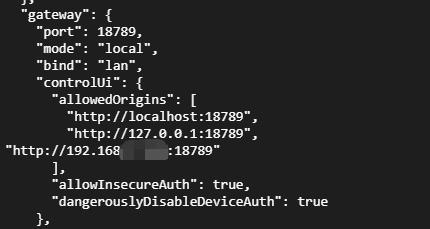
配置文件在:~/.openclaw/openclaw.json