
No module named ‘windows’
来源:https://www.cnblogs.com/sea-stream/p/10362884.html
pymouse安装后,又出现了ModuleNotFoundError: No module named ‘windows’的错误
解决:
下载安装pyhook:http://www.lfd.uci.edu/~gohlke/pythonlibs/
ctrl+f 查找 PyHook
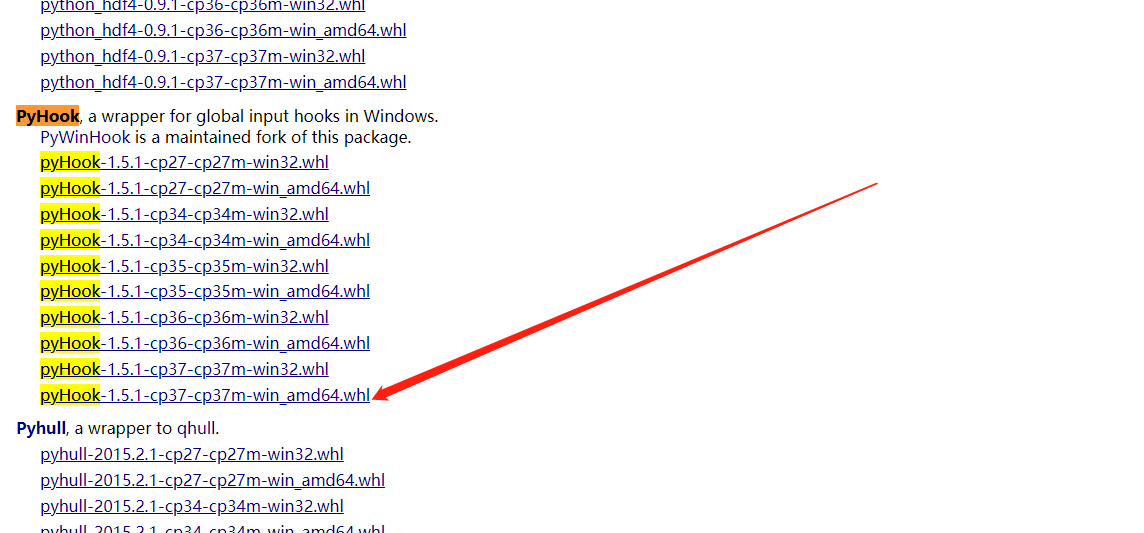
安装
pip install D:\Desktop\Download\pyHook-1.5.1-cp37-cp37m-win_amd64.whl
安装成功后,再安装
pip install PyUserinput
运行文件就没有ModuleNotFoundError: No module named ‘windows’提示了。